마우스 쓰면 팔이 아파요
마우스 사용 시 팔 통증은 손목, 팔꿈치, 어깨 어디에서든 발생할 수 있습니다. 반복적인 미세 움직임이 힘줄과 근육에 과부하를 주고, 장시간 같은 자세가 문제를 악화시킵니다.
아픈 위치별 원인
손목 통증
손목을 젖힌 상태로 마우스를 사용하면 손목 힘줄에 염증이 생기고, 손목터널증후군이나 건초염으로 이어질 수 있습니다.
팔꿈치 통증
팔꿈치 바깥쪽이 아프면 테니스엘보, 안쪽이 아프면 골퍼엘보일 수 있으며, 마우스 클릭을 반복하는 동작이 원인이 됩니다.
어깨와 목 통증
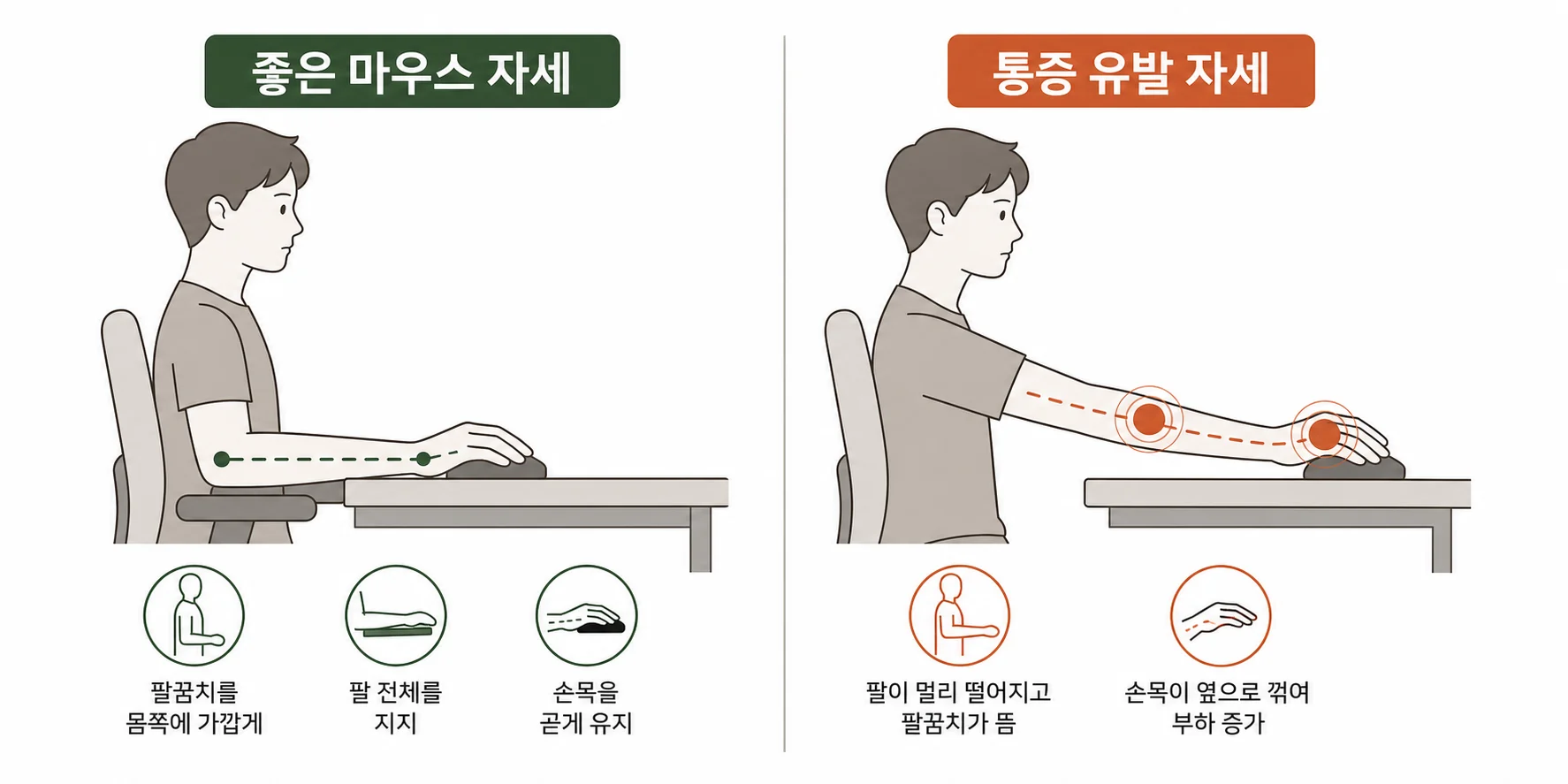
마우스가 너무 멀거나 팔을 든 자세를 유지하면 어깨에 과부하가 걸리고, 목까지 뻐근해지는 경우가 많습니다.
작업 환경 개선
- 마우스 위치: 팔꿈치가 90도가 되는 높이, 몸에 가깝게
- 손목 자세: 손목을 젖히지 않고 중립 유지
- 마우스 선택: 손 크기에 맞는 것
- 손목 패드: 클릭할 때는 떼고, 쉴 때만 사용
인체공학적 마우스의 한계
인체공학적 마우스는 통증을 일시적으로 줄여줄 수 있지만, 치료가 아닙니다. 근본적인 문제를 다루지 않으면 통증이 다시 나타날 수 있습니다. 마우스를 바꾸는 것보다 이미 손상된 힘줄과 근막을 치료하는 것이 우선입니다.
환경 개선만으로 부족하다면
이미 힘줄에 염증이 생겼거나 근막이 굳었다면 환경 개선만으로 해결되지 않습니다. 치료가 필요합니다.
업무 통증, 순환치료로 접근합니다
- 순환주사: 힘줄, 근막 염증 치료
- 순환재활: 작업 자세 교정, 스트레칭 교육
※ 치료 반응은 개인차가 있으며, 정확한 진단과 치료 방향은 진료 후 결정됩니다.
함께 많이 묻는 질문
참고 논문
- Andersen JH et al. Computer use and carpal tunnel syndrome: a 1-year follow-up study. JAMA. 2003;289(22):2963-2969. PMID 12799404
- Jensen C. Development of neck and hand-wrist symptoms in relation to duration of computer use at work. Int Arch Occup Environ Health. 2003;76(8):581-587.
- Fogleman M, Brogmus G. Computer mouse use and cumulative trauma disorders of the upper extremity. Appl Ergon. 1995;26(3):197-200.
최종 검토일: 2026-07-01